FITCAMX
- 3.2
- Rating
- 100.00K
- Installs
- Free
- Price

 Analysis by App-foxy
When I look at a dash cam app, I care less about a long feature list and more about one practical question: does it make the camera easier to use when I actually need it? FITCAMX APP is built specifically for FITCAMX dash cams, and that focused purpose is both its main strength and its biggest boundary. It is not a general driving companion or a replacement for a navigation app. Instead, it gives owners of compatible FITCAMX hardware a mobile way to work with their camera.
I tested it with the mindset of someone who wants a simple routine: drive normally, check what the camera recorded, and handle an important clip without turning the process into a technical project. That makes this a useful Auto & Vehicles app for a particular audience rather than an app I would recommend to every driver. It is free, available for Everyone, and comes from Viidure-pub. Its current version is v1.0.52.260131, and it runs on Android 6.0 or later.
The app has reached over one hundred thousand installs, with a 3.3 average from more than three hundred ratings and nearly ninety written reviews. Those figures suggest a product that has found a real user base but does not deliver a completely frictionless experience for everyone. My own impression is similar: the idea is useful, especially when paired with the right camera, but the quality of the experience depends heavily on how smoothly the phone and dash cam connect.
You May Also Like

 Google Keep - Notes and lists
Google Keep’s Quiet Growth Shows the Appeal of Simpler Notes
As mobile work gets busier, Google Keep keeps winning a simple contest: capture a thought quickly, find it later, and get on with the day.

 Blood Strike: 2.5 Anniversary
Blood Strike’s Loadouts Turn Every Drop Into a Tactical Gamble
A close look at Blood Strike’s custom loadouts: how fast access to signature weapons reshapes its battle royale rhythm, rewards preparation, and narrows the gap between fights.

 Pandora - Music & Podcasts
Pandora’s Music Is Easy to Start, but Harder to Recover
Pandora’s strength is its low-effort path from a seed to a station. Its weak spot is how much confidence it asks you to place in connection, setup, and quiet recovery.

 8 Ball Pool
 Is Built on Rivalries, Rematches, and Routine
A close look at the rivalries, rematches, shared routines, and unanswered safety questions that turn a quick pool match into a persistent mobile community.

 Samsung Music
’s Quiet Strength Is Playing What You Already Own
Its reach comes less from spectacle than from dependable access to a personal library. That simplicity is both the app’s strongest retention engine and its ceiling.

 AccuWeather: Weather Radar
AccuWeather Review: A Quick, Clear Forecast for Everyday Decisions
For everyday plans, the best forecast is the one you can understand quickly. AccuWeather makes rain timing, radar, and local conditions easy to act on, with a few trade-offs.
More From Our News Desk



FITCAMX APP is really about removing the camera from the windshield routine
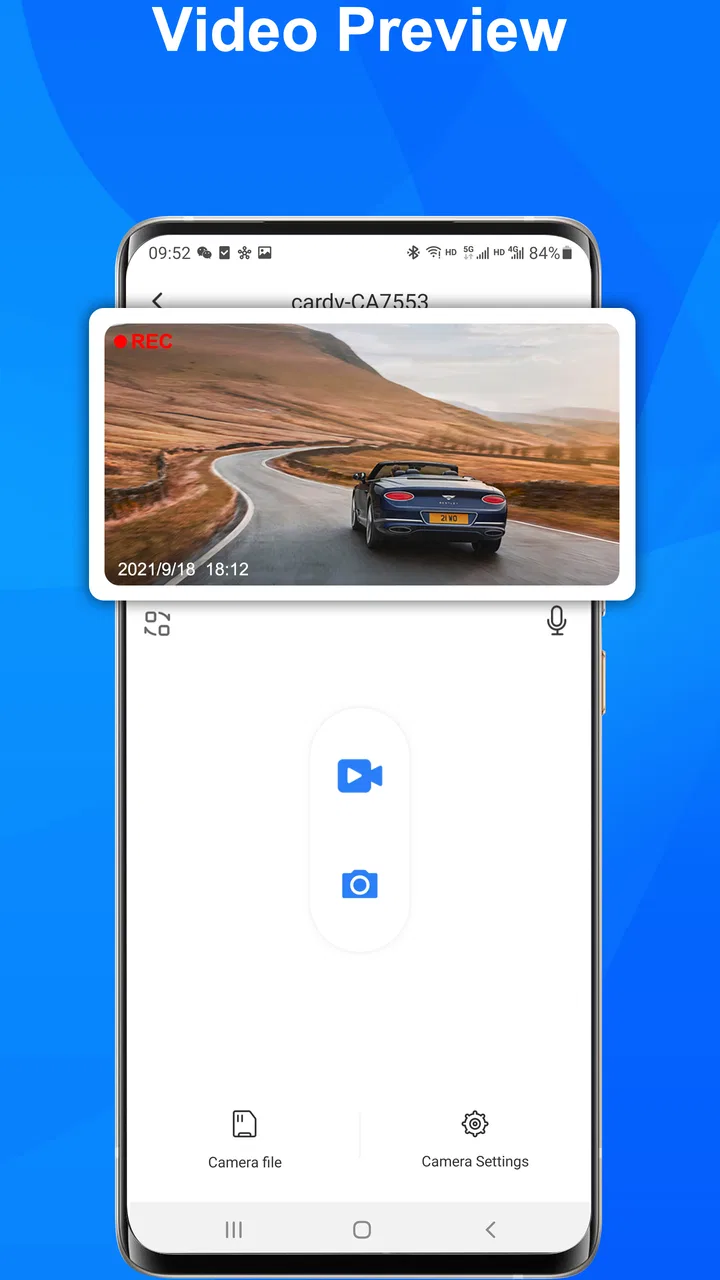
The central capability is straightforward: the app acts as a mobile companion for FITCAMX dash cams. Rather than treating the camera as a standalone device whose recordings stay locked away until you remove storage or use another method, the app gives the phone a role in viewing and handling the camera’s content.
That sounds modest, but it changes the everyday workflow. A dash cam is most valuable when a recording can be checked quickly after a questionable incident. If I have to wait until I am at a computer, locate the correct file, and work out which clip contains the relevant moment, the camera becomes less convenient. A companion app can shorten that path from “something happened” to “I have checked the recording.”
The important point is that FITCAMX APP is not trying to compete with broad-purpose driving apps. It does not need to offer maps, fuel prices, route planning, or a social layer to be useful. Its job is narrower: connect the phone to a FITCAMX camera and make camera-related tasks more accessible. That narrow focus is why I would judge it differently from a navigation or vehicle-maintenance app.
For a FITCAMX owner, the app can become the practical control point for reviewing footage. For somebody who owns a different dash cam, however, there is no reason to install it simply because it is free. The app’s value comes from the hardware relationship, not from independent features that would help any driver.
The capability matters most after an unexpected moment
The best reason to use a phone companion for a dash cam is not casual browsing. It is the short period after something unusual happens: a sudden brake, a minor collision, an argument about right of way, or damage discovered after returning to a parked vehicle. In those situations, I want to confirm whether the camera captured the event before I continue with the rest of my day.
That is where the app’s purpose becomes concrete. I can use the phone as the first place to inspect the recording instead of treating the dash cam as a device that only matters when a serious claim occurs. A quick review can also prevent a common mistake: assuming that a camera recorded the exact moment I need when the relevant part of the journey may be in an adjacent clip.
I would not treat the app as proof that every recording is automatically backed up or permanently safe. A phone connection and a convenient viewing workflow are not the same thing as a complete evidence-management system. If a clip matters, I would review it promptly and preserve it using a separate, dependable method rather than leaving the only copy inside a camera workflow.
This is one of the more useful habits the app encourages: check first, preserve second, share only after confirming that the file and context are correct. That sequence is more reliable than immediately sending the first clip that appears on screen.
How the connection changes the practical experience
The first-use experience is shaped by the relationship between the app, the phone, and the FITCAMX camera. The app is only helpful when those three parts cooperate. I would begin by keeping the phone close to the camera, stopping the vehicle safely, and allowing enough time for the connection process rather than trying to set everything up while driving.
That last point is important. Dash cam apps can tempt drivers to interact with the screen at exactly the wrong time. FITCAMX APP should be treated as a parked-car tool. Before a trip, I would establish the connection and leave the camera alone. After an incident, I would pull over somewhere safe before opening the app and searching for footage.
Once connected, the useful workflow is not simply “open everything.” I recommend looking for the event by time and driving context. If the moment occurred near the end of a journey, start with the most recent recordings. If it happened earlier, work backward from the approximate time rather than opening clips randomly. This reduces the chance of confusing a normal section of road with the moment that matters.
A second practical tip is to review the clip before deciding whether it is worth keeping. A recording can be technically present but still fail to show the relevant angle, distance, or timing. Watching it once helps me understand whether I need a neighboring clip as well. In a dispute, the seconds before and after an event may be more useful than the instant of impact alone.
The app is therefore most effective when I use it as a focused inspection tool, not as a place to endlessly browse recordings. That distinction keeps the experience quick and reduces the frustration of managing more footage than I actually need.
A realistic everyday scenario: checking a near miss
Imagine leaving a supermarket car park and having another vehicle cut across the exit. Nothing is damaged, but the maneuver is close enough that I want to know whether the dash cam captured the other car clearly. I would park safely, open FITCAMX APP, connect to the camera, and locate the recording around the time I left the space.
The first viewing would answer basic questions: was the camera recording, is the other vehicle visible, and does the clip include enough lead-in to show what happened? If the answer is yes, I would then check the adjacent portion of footage so I am not relying on a fragment that begins too late. If the image is unclear or the event falls outside the camera’s view, the app cannot fix that limitation; it can only help me inspect what the camera captured.
This is a realistic strength because it avoids unnecessary escalation. I might discover that the incident was harmless and move on. Alternatively, I might find that the recording is important and then take the extra step of preserving it. The app helps with the decision, but it does not replace judgment about what the video proves.
A similar workflow applies after discovering a parking mark. I would search around the period when the car was left unattended, compare nearby clips, and avoid assuming that the newest file is automatically the relevant one. That small change in method is easy to overlook, yet it can save time when recordings are divided into multiple segments.
Where the app saves time, and where it adds friction
The main advantage is convenience. A phone is already the device most people use to inspect, organize, and communicate about media. Bringing the dash cam into that familiar workflow is more approachable than requiring a computer for every check. It also makes the camera feel less like a passive recorder and more like a tool I can consult when needed.
Another advantage is immediacy. If I am deciding whether an event deserves further attention, I can make that decision near the vehicle instead of postponing it. That matters when details are still fresh in my mind. It also helps me identify the correct time window while I remember where I was driving.
The friction comes from the same place: a wireless or phone-based connection is an extra step. If the camera is not immediately available, if the phone needs to switch connection behavior, or if the footage takes patience to inspect, the promised convenience becomes less impressive. I would not describe this as a replacement for every other way of handling dash cam files. It is an additional route, and its value depends on whether that route works smoothly in the moment.
There is also a human-factor limitation. An app can make footage easier to reach, but easier access can encourage careless handling. I would avoid deleting clips simply because they look unimportant at first glance, especially after an incident. I would also avoid relying on a single viewing without checking the surrounding recording. Convenience should shorten the process, not remove the verification step.
Compared with a dash cam that requires removing storage and using a computer, FITCAMX APP is more immediate and better suited to a quick roadside check. Compared with a camera system that includes a highly polished desktop archive, it may be less comfortable for long sessions of organizing many files. My preference would be to use the app for discovery and quick review, then use a larger screen or separate storage workflow when the evidence needs careful examination.
Three habits that make the companion app more useful
- Set up before the journey, not during it. I would confirm that the phone and camera work together while parked at home. That turns an urgent post-incident task into a familiar routine.
- Search by the event’s time window. Start with the likely part of the drive, then inspect the neighboring recording. This is faster and safer than assuming one visible clip tells the whole story.
- Separate inspection from preservation. Use the app to determine what happened, but keep important footage in a deliberate backup workflow. A clip that is merely viewable is not necessarily protected from later loss.
These habits also reveal the app’s trade-off. FITCAMX APP can make access easier, but it does not remove the need for an organized approach. The user still has to know when the event happened, recognize whether the camera’s view is sufficient, and decide what to do with an important recording.
Who benefits most from FITCAMX APP
The clearest audience is someone who already owns a compatible FITCAMX dash cam and wants a convenient phone-based way to interact with it. That includes drivers who dislike removing storage, people who want to check a near miss soon after it happens, and owners who prefer a mobile workflow over sitting at a computer for every small review.
It may also suit households where more than one person uses the vehicle. A phone companion can make the camera less dependent on one technically confident owner. The key is to establish the connection and basic review routine in advance, so another driver is not learning everything during a stressful moment.
I would be more cautious recommending it to somebody who expects a universal dash cam manager. The app is customized for FITCAMX cameras, so a driver shopping for a camera should choose the hardware first and then consider whether this companion experience matches their expectations. Installing it without compatible equipment does not create a useful standalone driving tool.
I would also point demanding users toward a different kind of solution if their priority is advanced evidence organization, extensive desktop editing, or a complete vehicle-management dashboard. FITCAMX APP’s focused purpose is a benefit for simple camera access, but it is not the same as a broad professional media system.
What the rating tells me about expectations
The 3.3 average is worth considering before downloading. I do not read it as proof that the app is unusable, but I do read it as a warning to keep expectations realistic. A companion app can be judged harshly when the underlying camera connection, phone behavior, or file workflow becomes inconvenient, even if the basic idea is sound.
In my view, the rating fits an app with a clear purpose and a potentially uneven experience. If the connection works reliably for a particular owner, the app may be perfectly adequate for occasional checks. If the user expects every interaction to feel as polished as a mainstream photo app, the limitations may become noticeable quickly.
The free price lowers the risk of trying it with the correct FITCAMX hardware. I would still approach installation as the beginning of a test rather than a guarantee. The meaningful question is whether it lets me find and inspect a recording in the conditions where I would actually need it: parked, short on time, and possibly dealing with a stressful event.
My final view after using it as a dash cam companion
FITCAMX APP succeeds when I judge it by its central job: bringing FITCAMX dash cam footage closer to the phone and making a quick review more practical. That can be genuinely valuable after a near miss, a suspected parking incident, or any moment when I need to know what the camera saw.
Its limitations are equally clear. It is tied to FITCAMX hardware, its average rating suggests that not every user finds the experience smooth, and convenient mobile access should not be confused with a full backup or evidence-archiving solution. I would also avoid using it while driving and would prepare the connection before setting off.
For the right owner, FITCAMX APP is best understood as a fast inspection layer for a compatible dash cam. It is free, supports older Android devices from Android 6.0 onward, and keeps the workflow centered on the footage rather than adding unrelated driving features. I would recommend it to FITCAMX users who want easier access to recordings and are comfortable with a focused, hardware-dependent tool. I would skip it as a general-purpose vehicle app and choose a different ecosystem if advanced file management matters more than simple mobile review.
FAQs for FITCAMX
01What is FITCAMX and how does it work?
FITCAMX is a cutting-edge dashcam app designed to provide seamless video recording for your vehicle. It connects wirelessly to your car’s camera, allowing you to monitor and manage recordings directly from your smartphone. The app offers features like real-time streaming, video playback, and cloud storage options to ensure your footage is safe and accessible.
02Is FITCAMX compatible with all vehicles?
FITCAMX is compatible with a wide range of vehicles, but it’s important to check the specific requirements listed on the app's website or in the app store description. Compatibility may depend on the make and model of your vehicle and whether you have a compatible dashcam installed that can connect with the app.
03What features does FITCAMX offer for video management?
FITCAMX provides a robust set of features for video management, including real-time video streaming, easy playback, and secure cloud storage. Users can organize footage efficiently, set up automatic recording triggers, and even share videos directly from the app. Its user-friendly interface ensures that managing your video data is straightforward and convenient.
04Is there a subscription fee for using FITCAMX?
While FITCAMX may offer a free version for basic use, advanced features, such as extended cloud storage and premium support, might require a subscription fee. Pricing details can vary, so it's advisable to review the app's subscription plans on their website or within the app itself to understand any potential costs involved.
05How secure is the data stored in FITCAMX?
FITCAMX prioritizes user data security by employing encryption methods to protect stored footage. The app also offers secure cloud storage options, ensuring that your video data is safely backed up and accessible only to you. Regular updates and support from the development team help maintain a high level of security for all users.
Pros
- User-friendly interface for all levels.
- Seamless integration with fitness devices.
- Customizable workout plans available.
- Rich library of exercise tutorials.
- Real-time performance tracking.
Cons
- Limited offline functionality.
- In-app purchases can be costly.
- Occasional sync issues with devices.
- Requires a stable internet connection.
- Some features need premium access.

FITCAMX
Gallery